




Written by Joe Benton – Team iOS at Moneybox
We’re moving to weekly releases
Here at Moneybox we have recently changed from working towards planned periodic releases to a weekly release cycle. This has helped to streamline our process, as there is no longer a need for a release planning meeting.
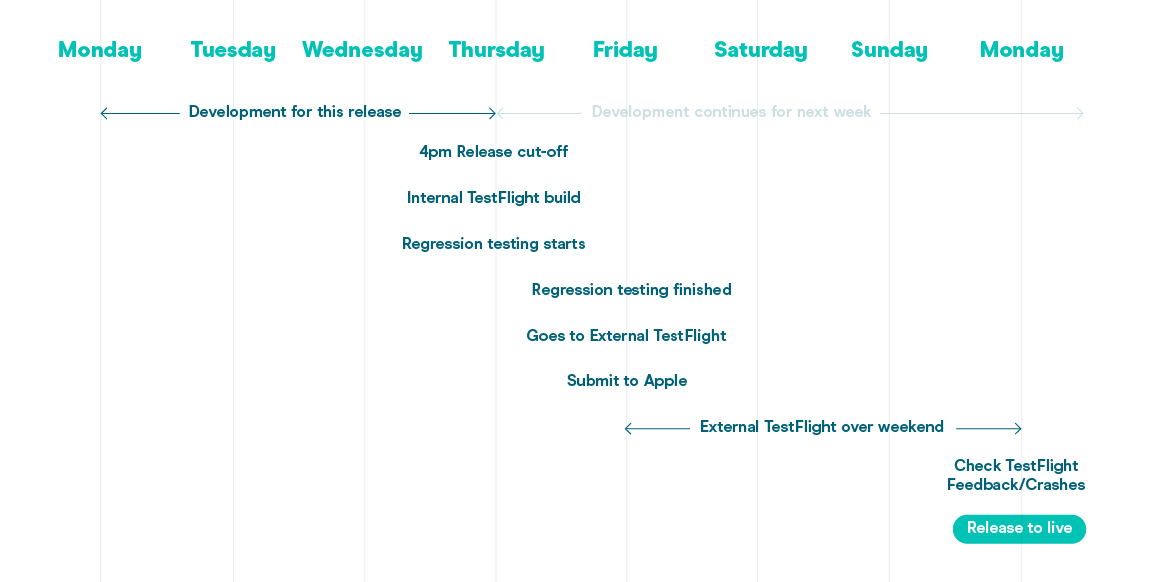
We now use the concept of a “release train”. At a set time each week, code that is currently merged in our develop branch gets bundled into a release. If a feature is ready to release at that time then it catches the train, but if there is still outstanding work then it misses the train and goes into the next week’s release.
We have also introduced the concept of feature flags, where new features or flows can be hidden until they are ready to be turned on at a later date. This has helped us to overcome the issue of features becoming dependent on each other and having to wait for everything to be completed before a new app update is ready, which can potentially delay a release.
Having a weekly release cycle means that the continuous integration (CI) setup for the mobile app is more important than ever. We use Bitrise and Fastlane tools to form our CI, which allows us to keep things moving reliably and quickly with multiple builds made throughout the week in a continuous cycle.
Automating with Bitrise and Fastlane
Bitrise is a platform that has cloud machines which can run macOS and Xcode. We use Bitrise to make new builds of our app whenever we make changes, and these can then be shared with the team. We also use Bitrise when we want to create a new release for the week.
Bitrise works by setting up workflows that run a series of steps. These workflows can be triggered by certain actions. Our steps include cloning the project from GitHub, then passing the work onto Fastlane for the rest of the build. Fastlane is a great set of tools for iOS developers that handles tedious tasks and simplifies the development and release process.
Example: Pull Requests and Making Builds
When we open a Pull Request on GitHub it triggers a workflow to begin via a Github WebHook, then runs the corresponding lane in Fastlane. We have a Fastfile that defines all of these lanes. Part of it looks like this:
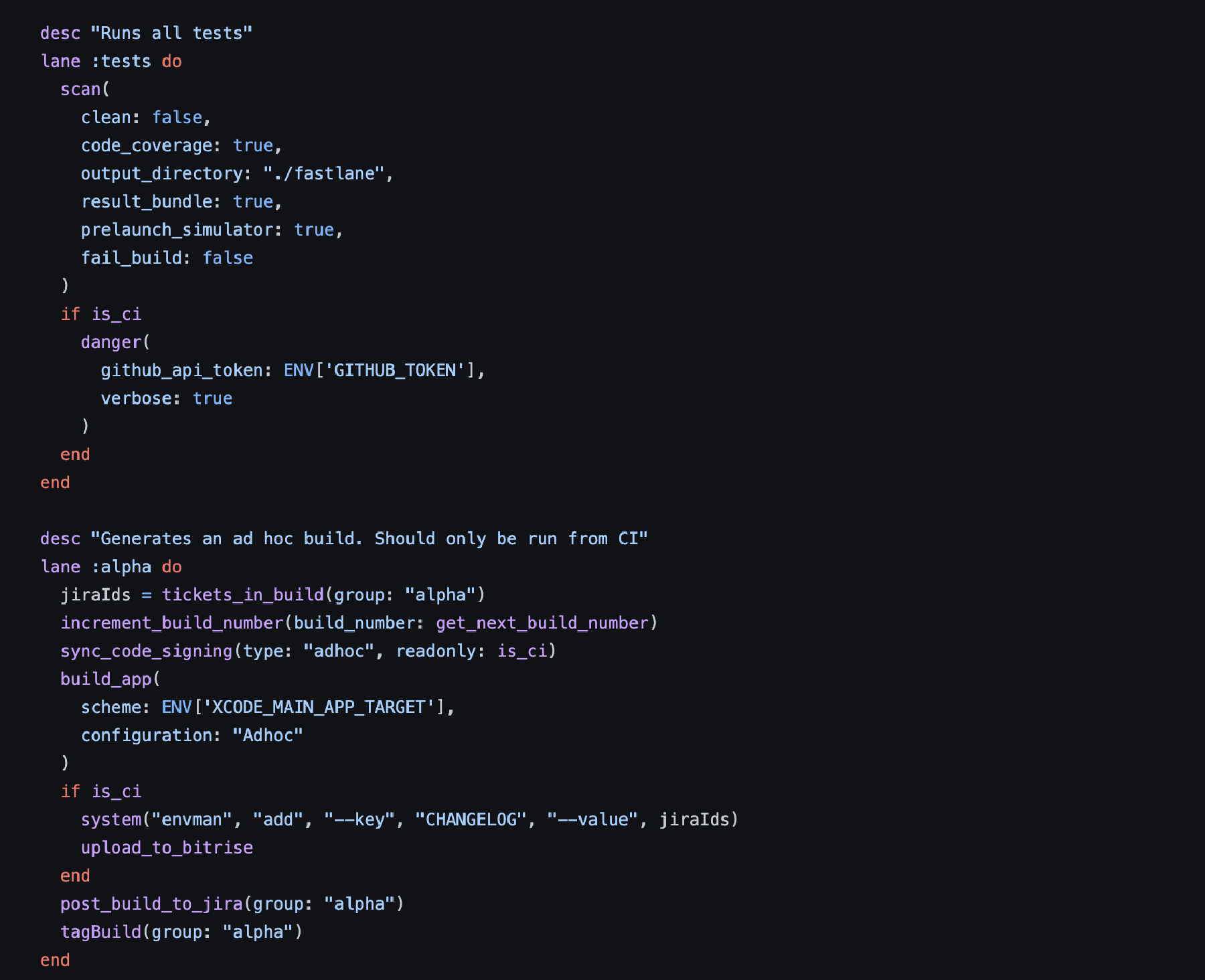
The ‘tests’ lane above runs from opening the pull request. It uses the ’scan’ feature of Fastlane to make sure the app builds without any errors, runs all the unit tests to ensure that they pass, and puts a status on the pull request. This lets us check any issues early on and ensures that they can be fixed in the pull request instead of merging in changes which may break the develop branch, which needs to be stable and remain production-ready.
We also use a library called Danger that runs as part of this lane to provide comments on the Pull Request. It runs a test coverage report on any changed files to make sure they have unit tests and to surface any syntax formatting suggestions from SwiftLint. This is to try and encourage more of our code to be unit tested and to ensure that changes follow similar coding guidelines within the team.
 When a Pull Request gets merged in, similarly Bitrise gets notified and the ‘alpha’ lane runs. This increments the build number, builds the app with our test configuration and uploads the compiled app up to Bitrise. We use Fastlane Match to synchronise our certificates and provisioning profiles using sync_code_signing so that it has everything it needs to build the app for Ad-Hoc distribution (or if it’s a release build later in the weekly process).
From here, it generates a link and QR code to the completed build on Bitrise which gets shared in our team Slack channels. We also work out which tickets this build includes by looking at the changelog of git commits since the last build, as they contain the ticket number. We can then post a comment on included Jira tickets to update the team with what build they can install to test the features on. This process repeats throughout the week as we work on new features and create builds for Product and the Quality Assurance (QA) team to test on.
Creating a Release
Our code-cut off point for our weekly release train is 4pm on a Thursday. At this point we can use Scheduled Workflows in Bitrise to automatically run at a specific date and time. “fastlaneCreateReleaseBranch” workflow begins and Fastlane creates a new /release branch for this week’s release, tags the build as a release and then bumps the version on /develop so that development can continue for next week.
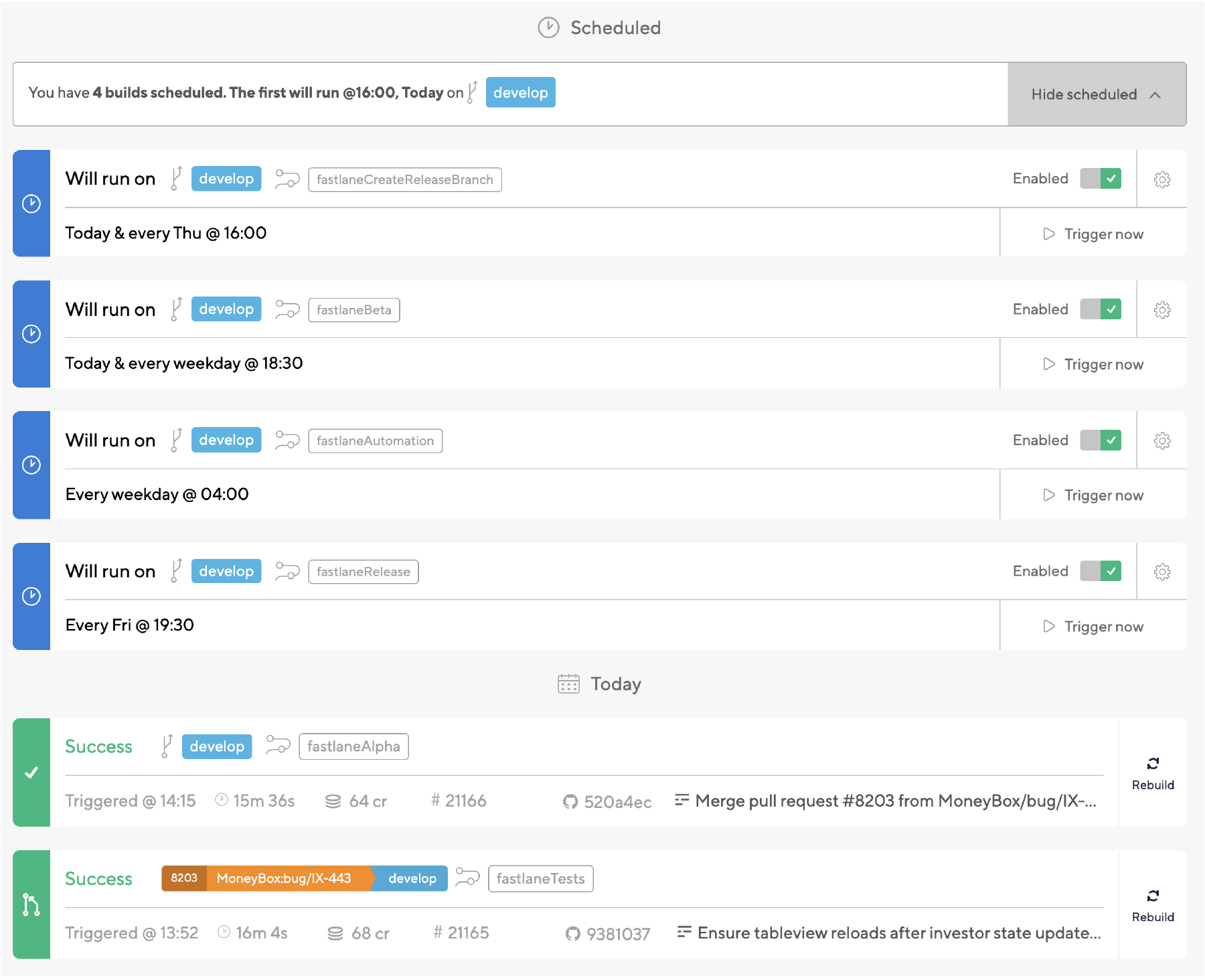

Whenever a new /release branch is made or updated Bitrise runs the ‘release_internalBeta’ lane to build the app with our production configuration so that a new release can be uploaded to App Store Connect. This is used for internal TestFlight and also to make sure that a build is ready to submit for review later. This is achieved by using the Fastlane upload_to_testflight action that is part of Pilot to handle the uploading process to App Store Connect.
A QA build is also made which points to our regression environment so that QA can do final manual regression testing before we send out the new version to external TestFlight users on a Friday afternoon. If any bugs are found at this point (or over the weekend) then they can be fixed and merged into this /release branch and this step will automatically be rerun and new builds are triggered for us.
Conclusion
Continuous Integration tools allow us to automate many tasks and streamline the development cycle to work alongside weekly releases. This helps the release train to leave on time and gets new features out into the hands of our users quickly.
If you want to join us on the weekly release train and help us work on some new amazing features in the iOS team, check out our open roles.